

Are you looking for a single platform for networking, branding, selling, and marketing? LinkedIn – the largest and most powerful professional networking platform with 830 million users– is your answer. Hiring managers consider it to be the best recruiting tool. The “LinkedIn Easy Apply” button has made life a lot easier for job seekers. Additionally, there is “LinkedIn Learning” for those who are looking to upgrade their skills. LinkedIn provides several useful tools for professionals. The question is, do you know how to leverage it to grow your business? More than 90% B2B marketers use LinkedIn as part of their content marketing strategy. It offers a variety of features that companies, and marketers can leverage. Before diving into these features, let’s get our basics right
Optimize your LinkedIn company profile
- Determine why you need the page
- Fill out company page details
- Update your cover photo and company logo
- Add admins to your page
- Share fresh content
- Create and join relevant LinkedIn groups
Optimize your LinkedIn posts
- Create and post original content for your LinkedIn Business page
- Maintain consistency in your brand color and communication
- Use a powerful Call to Action (CTA) and redirect your audience to the right pages of your website
- Do your hashtag research and use 3-4 hashtags with high search volumes on each post
- Use keywords (that are being used for your website for SEO purposes) within your captions and creative
- Make your post clickable and customize image and titles
To reach the right people at the right time is one of the top marketing challenges for a B2B company. To be successful, B2B marketers must pull in, interact with, and include all important decision-makers in the purchasing process at every level. Now that you are up to speed with the basics, lets dive into some of the cool features LinkedIn offers to market your Business.
LinkedIn Content Strategy: What to Post and When
A LinkedIn Company Page without a consistent content strategy is a missed opportunity. Content is how you build authority, stay top-of-mind with buyers, and generate organic inbound interest — without spending on ads.
Content types that perform for B2B companies
Original thought leadership posts: Share your team’s genuine perspective on industry trends, challenges, and shifts. First-person insights from your leadership team written in a direct, opinionated voice, consistently outperform generic “tips” content on LinkedIn.
Data-backed insights and research: Original data, surveys, or benchmarks you publish are among the most shareable content types on LinkedIn. If you have access to interesting client data (anonymised), publish it. If you have industry benchmarks, lead with the surprising number.
Short-form video: Video content receives 5x more engagement than text-only posts on LinkedIn. Behind-the-scenes content, quick expert commentary, and client success stories in video format outperform polished corporate videos.
Case studies and proof content: For B2B buyers in the consideration stage, nothing builds trust faster than a specific, outcome-focused case study. Lead with the result in the post copy — “We helped a SaaS company reduce their CAC by 40% in 6 months” — and link to the full story.
Best practices for LinkedIn post optimisation
- Use 3–5 relevant hashtags per post with genuine search volume (e.g. #B2BMarketing, #DemandGeneration, #LinkedInMarketing). More than 5 looks spammy and dilutes reach.
- Lead with a hook in the first line. LinkedIn truncates post copy after the first 2–3 lines. Your opening sentence must create enough curiosity or urgency that readers click “see more.” Questions and bold statements outperform generic openers.
- Use keywords intentionally. Incorporate the same keywords you target for SEO into your LinkedIn post copy and creative text. LinkedIn’s search algorithm uses these for content discovery.
- Customise link preview images and titles when sharing external URLs. LinkedIn allows you to edit the default title and description that appears — always customise these to maximise click-through.
- Maintain brand consistency. Use consistent colour palettes, fonts, and visual style across all creative assets. Brand recognition on LinkedIn compounds over time.
- Post frequency: For most B2B companies, 3–5 posts per week on your Company Page is the optimal range. Daily posting can actually suppress reach if engagement rates drop.
How to Grow Your LinkedIn Followers
Invite your connections and grow your followers
If you are the super admin of a LinkedIn Page, you can increase the number of followers on your page by inviting your first-degree connections to follow you. Each page receives a fixed amount of monthly invitation credits that are distributed among the super admins of the page. Here’s how you can invite them:
- Go to your company’s LinkedIn page and click on admin tools on the top right corner
- Click on the “Invite Connections” option from the drop down
- Select those connections you want to send the invitations to by using a filter option (if needed) and invite them to follow your company’s page
Optimize your Search Rank for LinkedIn:
- Use the keyword research from your website optimization to make sure people can discover your page.
- Include a link to your website on your company page, publish links to relevant pages like your careers page and invite followers to share these posts.
- Frequently share thought leadership articles/posts from industry professionals on LinkedIn or Medium to keep your audience engaged.
- Include a robust ‘About Us’ section with information about your company’s vision, values and what you offer, as well as pertinent career information for prospective employees.
LinkedIn Sales Navigator
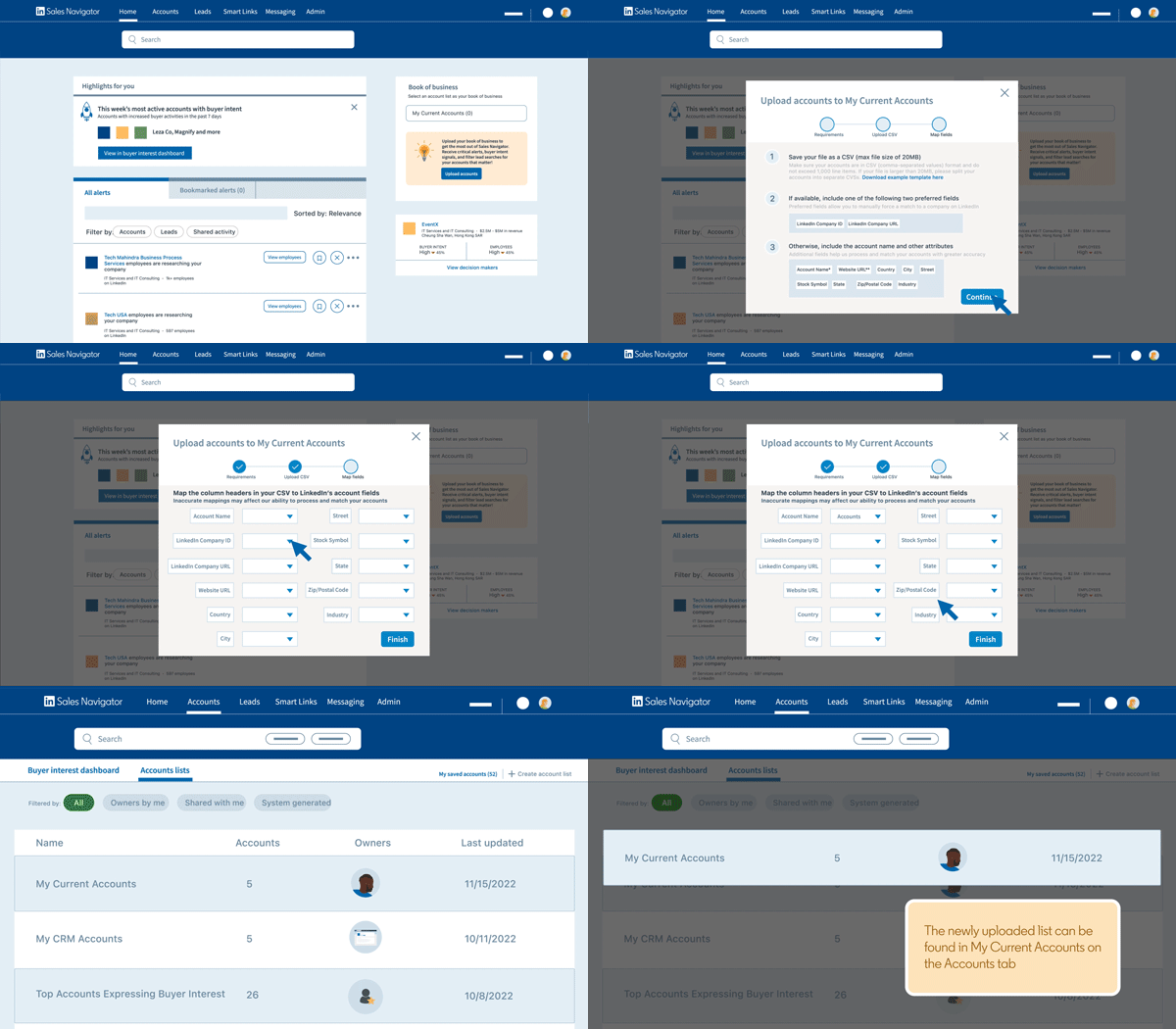
If you’re a B2B Marketer or a B2B salesperson, then LinkedIn Sales Navigator is meant for you.
LinkedIn Sales Navigator- a paid feature, is a sales enablement platform that offers several tools to discover and filter the right prospects to develop trustworthy relationships.
It also offers useful data and insights that can help in developing a deeper understanding of leads and prospects. By providing customized material, exciting discounts and offers, you can interact with your prospects on a personal level.
Benefits
- Generate Leads by filtering your target audience according to geography, industry, company, keywords and other key information.
- Save up to 5,000 prospects after searching for potential prospects.
- Send up to 30 InMails per month to potential customers.
LinkedIn Live
Instagram and Facebook first launched live streaming back in 2016. LinkedIn launched its live streaming feature only for creators & individual users in early 2019. They added the LinkedIn live feature to business pages in 2020.
A LinkedIn profile, LinkedIn Page, or Event can stream live video material through LinkedIn Live, which is available to approved members and Pages.
Review the LinkedIn Live access requirements if you want to broadcast on LinkedIn Live. Once you go through the requirements, you can access the LinkedIn live feature.
Here’s a step-by-step guide to get LinkedIn live for your business:
- Apply for LinkedIn live.
- Register to a third-party broadcasting platform.
- Link your LinkedIn tool with a third-party broadcasting platform.
- Set your event details and go live.
LinkedIn Ads
Like Facebook, LinkedIn also gives marketers a platform to run paid advertisements. They are comparatively expensive, but if used correctly, LinkedIn ads can guarantee that the right audience knows about your brand.
Create a Campaign Manager Account – Through Campaign Manager, LinkedIn offers you a comprehensive advertising platform to create ad accounts and manage campaigns while managing your budget. To get started, all you need is your current LinkedIn account.
Define your Goal/Objective – Clarity regarding your ideal advertising strategy, brand awareness direction and business objective will allow LinkedIn to tailor your campaign creation effectively.
Once you’ve decided on your goal, LinkedIn will direct you to create an audience, choose a budget and upload your original advertisement. Set up your payment information and your campaign is good to go.
Use LinkedIn Analytics
Without analytics, you won’t know what content generates the most interest. Monthly engagement statistics of your company’s and individual posts are displayed on your LinkedIn Analytics Page. You can optimize your posts based on performance data and witness an increase in engagement over time.
With LinkedIn Analytics, you can:
- Analyze your data to identify the right types of content that will engage the right audience. Filter down the visitor’s demographic by their job function, company size, location, industry and seniority. Understand your audience demographic effectively and generate content that would appeal to the people who are watching.
- Keep an eye on your competitors by viewing the competitors’ analytics.
- Add tracking codes to your post links to track how much traffic your firm is receiving through LinkedIn Page updates and adjust future site links when necessary.
Conclusion
LinkedIn is the best social media platform for B2B marketing and provides a wealth of options. LinkedIn’s features can be a game changer if implemented right in your marketing plan. Make sure you have a LinkedIn strategy and constantly objectify these tasks to understand where you are and where you are headed.
FAQs
1. Is LinkedIn worth it for B2B marketing?
Yes, LinkedIn is consistently the highest-performing social platform for B2B lead generation and brand building. It generates 80% of B2B social media leads and gives B2B marketers direct access to decision-makers that are difficult to reach on any other platform. The ROI depends on having a clear strategy, consistent content, and the right mix of organic and paid activity.
2. How often should a B2B company post on LinkedIn?
For most B2B companies, posting 3–5 times per week on your Company Page is the optimal frequency. Consistency matters more than volume, an irregular posting schedule that spikes then disappears tells the algorithm your page is unreliable and suppresses reach. Build a content calendar and stick to it.
3. What types of content perform best for B2B on LinkedIn?
Original thought leadership, data-backed insights, short-form video, and client case studies consistently outperform generic promotional content. Posts that offer a genuine perspective, share a specific number, or pose a provocative question in the first line tend to earn the highest organic reach.
4. How much do LinkedIn Ads cost for B2B?
LinkedIn Ads average £5–£15 per click, significantly higher than Google or Facebook. However, the audience quality for B2B is unmatched, you can target by exact job title, seniority, company size, and industry. For B2B companies with a clear ICP and a well-optimised offer, the cost-per-lead is often lower than it appears when measured against closed revenue.
5. What is LinkedIn Sales Navigator and do I need it?
LinkedIn Sales Navigator is a paid prospecting tool that gives B2B sales and marketing teams advanced search filters, lead saving, InMail credits, and real-time buying signals. It is worth the investment for teams running active outbound or ABM motions. If you are primarily focused on inbound, organic LinkedIn and LinkedIn Ads may deliver stronger ROI for your budget.
6. How do I measure LinkedIn ROI for B2B?
The most accurate way to measure LinkedIn ROI is to connect LinkedIn activity to pipeline using UTM tracking and CRM attribution. Add UTMs to all LinkedIn post links and ads, track conversions in HubSpot or your CRM, and report on LinkedIn-influenced leads, MQLs, and opportunities. Vanity metrics like followers and impressions matter less than LinkedIn’s contribution to qualified pipeline and closed revenue.